
In the infinite gallery of the internet, where millions of pixels fight for a millisecond of attention, your website is your canvas. It is not merely a collection of codes and scripts; it is the digital extension of your soul, your brand, and your voice. But even the most profound words can get lost if the vessel carrying them is fragile or unappealing.

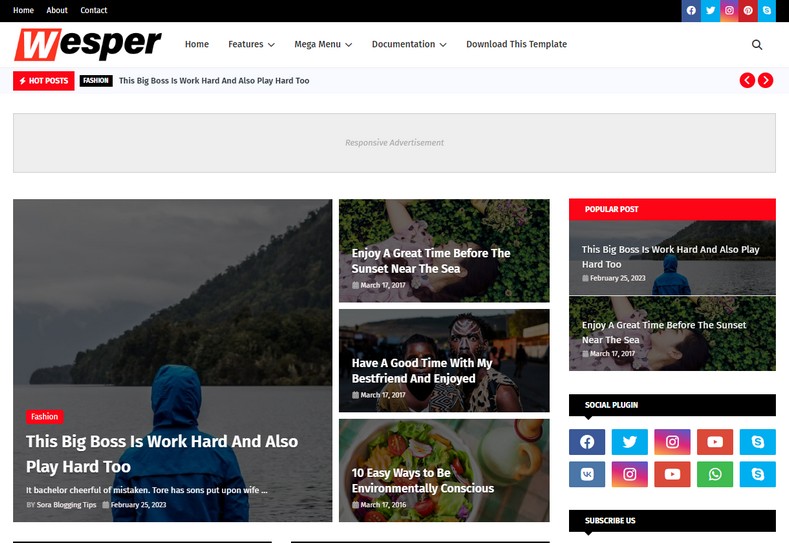
Imagine a visitor landing on your blog. Within the blink of an eye—literally less than three seconds—they decide whether to stay and explore your world or to bounce back into the void of search results. This decision is rarely based on content initially; it is based on feeling. Does the site feel fast? Does it feel professional? Does it feel trustworthy? Enter Wesper. Wesper is not just another Blogger template; it is a meticulously crafted instrument designed for creators who refuse to compromise between aesthetics and performance. It is where the lush vibrancy of modern design meets the rigid discipline of SEO engineering. In this extensive guide, we will dissect why the Wesper Blogger Template is the chosen tool for successful publishers, how its "Green" philosophy influences user psychology, and how you can leverage it to dominate search engine rankings.
The Philosophy of Wesper: A Symphony in Green
Design is never accidental. Every curve, every shadow, and every hue serves a purpose. The Wesper template embraces a philosophy of "Functional Minimalism." It strips away the clutter that plagues legacy Blogger templates—the heavy scripts, the flashing widgets, the disarray—and replaces them with clean lines and purposeful white space.
"Simplicity is the ultimate sophistication. In a digital world screaming for attention, the quiet confidence of a clean design roars the loudest."The primary accent color of Wesper is a sophisticated Green. In color psychology, green is the great balancer. It sits right in the center of the visible spectrum. It represents growth, harmony, freshness, and safety. For a blog, this is invaluable. When a user sees the green accents of Wesper, their subconscious registers a sense of calm and reliability. Whether you are running a financial blog (money), a health blog (vitality), or a tech review site (progress), this color palette creates a backdrop of trust. It reduces visual fatigue, encouraging readers to stay longer and read more.
The Engine Under the Hood: SEO & Performance
Beauty without brains is a tragedy. Fortunately, Wesper is a genius. The developers behind this template have prioritized Search Engine Optimization (SEO) above all else. But what does that actually mean for you as a blogger?
1. Core Web Vitals Ready
Google's latest algorithm updates focus heavily on "Core Web Vitals"—metrics that measure how fast a page loads, how interactive it is, and how stable the layout is. Wesper is coded to be lightweight. It minimizes the "Cumulative Layout Shift" (CLS) so that your content doesn't jump around while loading, a trait Google loves.2. Schema.org Structured Data
Wesper comes embedded with rich snippets and Schema markup. This is the language search engines speak. It tells Google, "This is the headline," "This is the author," "This is the image." By providing this roadmap, you increase the chances of your content appearing in featured snippets and rich results, which drives significantly more organic traffic.3. Mobile-First Indexing
We live in a mobile world. If your site looks bad on a smartphone, you are invisible. Wesper is fully responsive. It doesn't just "shrink" the desktop version; it intelligently rearranges the grid system to fit any screen size, from the smallest Android device to the largest iPad Pro.A Canvas of Possibilities: Key Features
Let’s dive deep into the feature set that makes Wesper a popular choice among professional bloggers.
- Magazine & Personal Layouts: Whether you are running a news aggregate site or a personal diary, the layout adapts. The homepage features a stunning featured post section that grabs attention immediately.
- AdSense Optimized: For many, blogging is a business. Wesper includes strategic ad slots in high-visibility areas (header, sidebar, inside posts) that maximize Click-Through Rate (CTR) without annoying the user.
- Advanced Author Box: Building authority is key. The stylized author box below every post allows you to connect with your readers, display your bio, and link to your social profiles.
- Social Sharing Integration: In the viral age, sharing must be frictionless. Wesper integrates lightweight social sharing buttons that encourage your content to travel across Facebook, Twitter, Pinterest, and WhatsApp.
- Cross-Browser Compatibility: Your site will look identical whether your visitor is using Chrome, Firefox, Safari, or Edge.
Technical Specifications
Feature
Description
Benefit
Platform
Blogger (Blogspot)
Free hosting, Google security.
Language
XML, HTML5, CSS3, jQuery
Modern standards, fast rendering.
Responsiveness
100% Fluid Grid
Fits all device screens perfectly.
Layout Option
Right Sidebar / Full Width
Flexible for different content types.
Menu Support
Dropdown & Mega Menu
Easy navigation for complex sites.
The Creator’s Guide: Installation & Setup
Transitioning to a new theme can be daunting, but with Wesper, the process is streamlined. Follow this step-by-step guide to transform your blog.
- Backup Your Data: Before making any creative changes, always secure the past. Go to your Blogger Dashboard > Theme > Backup. Save your current XML file. This is your safety net.
- Download Wesper: Use the download button provided at the end of this article to get the ZIP file. Extract this file on your computer. You are looking for the file ending in
.xml. - The Upload: Return to the Blogger Theme section. Click on the arrow next to "Customize" and select "Restore". Click "Upload" and select the Wesper XML file you just extracted.
- Layout Configuration: Once uploaded, go to the "Layout" tab. Here you will see the skeleton of Wesper. This is where you can add your logo, set up your social links, and configure the main menu.
Is Wesper Right for Your Niche?
One of the most frequent questions creatives ask is: "Does this fit my brand?" Wesper is a chameleon. Its neutral structure, accented by the fresh green, makes it suitable for a wide array of niches:
1. Technology & Gadgets: The clean lines mimic the design language of modern tech companies. The responsive layout is perfect for reviewing the latest smartphones or coding tutorials.
2. Health & Wellness: The green color palette is a natural fit (pun intended) for blogs discussing nutrition, yoga, mental health, and organic living.
3. Finance & Crypto: Green is the color of money. Wesper provides a professional, serious look that instills confidence in readers looking for investment advice.
4. Travel & Lifestyle: The large featured image areas allow travel photographers to showcase their stunning visuals without the theme getting in the way.
Free vs. Premium: Making the Choice
The version provided here is the Free version of Wesper. It is a powerful tool, fully capable of running a successful blog. However, for the true professional who demands perfection, the Premium version offers distinct advantages.
The Free Version is perfect for hobbyists and those starting their journey. It includes the core design, responsiveness, and basic SEO features. However, it requires you to keep the footer credits intact, linking back to the designer.
The Premium Version unlocks the full potential. It allows you to remove the footer credits (essential for branding), provides lifetime support from the developer, and often includes more widget options and faster updates. If you are generating revenue from your site, the small investment in the premium version is often worth the credibility it buys.
Creative Customization: Make It Yours
You are a creative soul. You don't just want a template; you want a signature. Here is how to add your creative touch to Wesper:
Typography: While Wesper comes with excellent default fonts, you can easily integrate Google Fonts to change the headings. A serif font for titles can add a touch of elegance, while a geometric sans-serif adds modernity.
Logo Design: The logo is the crown of your site. Ensure your logo uses a transparent background (PNG). If your logo has green elements, match the hex code exactly to the theme's green (#27ae60) for a seamless look.
Content Formatting: Use the formatting tools within your posts. Wesper handles blockquotes, bullet points, and headings beautifully. Break up your text to keep the reader engaged.
Final Thoughts: Your Journey Begins Here
As we conclude this extensive exploration of the Wesper Blogger Template, it is important to remember that a template is only a tool. It is the foundation, the frame, and the stage. But the play is written by you. Wesper provides you with the most professional, SEO-friendly, and aesthetically pleasing stage possible for a free template. It removes the technical barriers that often discourage new bloggers, allowing you to focus on what you do best: creating.
In a digital ecosystem where speed is currency and design is trust, Wesper is a sound investment of your time. Its green accents invoke growth, its code ensures visibility, and its layout guarantees readability. Whether you are seeking to monetize through AdSense, build a personal brand, or simply share your thoughts with the world, this theme stands ready to support your ambition.
Do not let your content suffer in a slow, outdated container. Upgrade your digital presence today. Download the template, play with the settings, and watch your blog transform from a simple webpage into a professional publication.
We want to hear your story.
Have you installed Wesper? How has it changed your site's speed? Did you find the customization process easy? Perhaps you have found a unique way to use the widget areas that we didn't mention? Please, leave a comment below! Your feedback is the lifeblood of this community. Share your blog links so we can see your creativity in action. If you faced any issues during installation, drop a question—let's solve it together. Your interaction not only helps us create better content but helps fellow bloggers navigate their own journey. Let's build a web of beautiful, fast, and successful blogs, starting right here, right now.
Tags:
Blogger Templates